Hey everyone,
You may have noticed my posts around the forum and I thought I’d finally explain here what I’m working on in full length because there’s some pretty pictures and some interesting settings to share.
I’ve been deep in R&D on my new character project — a portrait and cut-out animation of Queen Hatshepsut, rendered and animated entirely using open-source tools (Krita, Blender, and Armory SDK 2025).
While there’s not much from the game to actually show RIGHT NOW, rest assure that it looks pretty much like this at the moment in game:
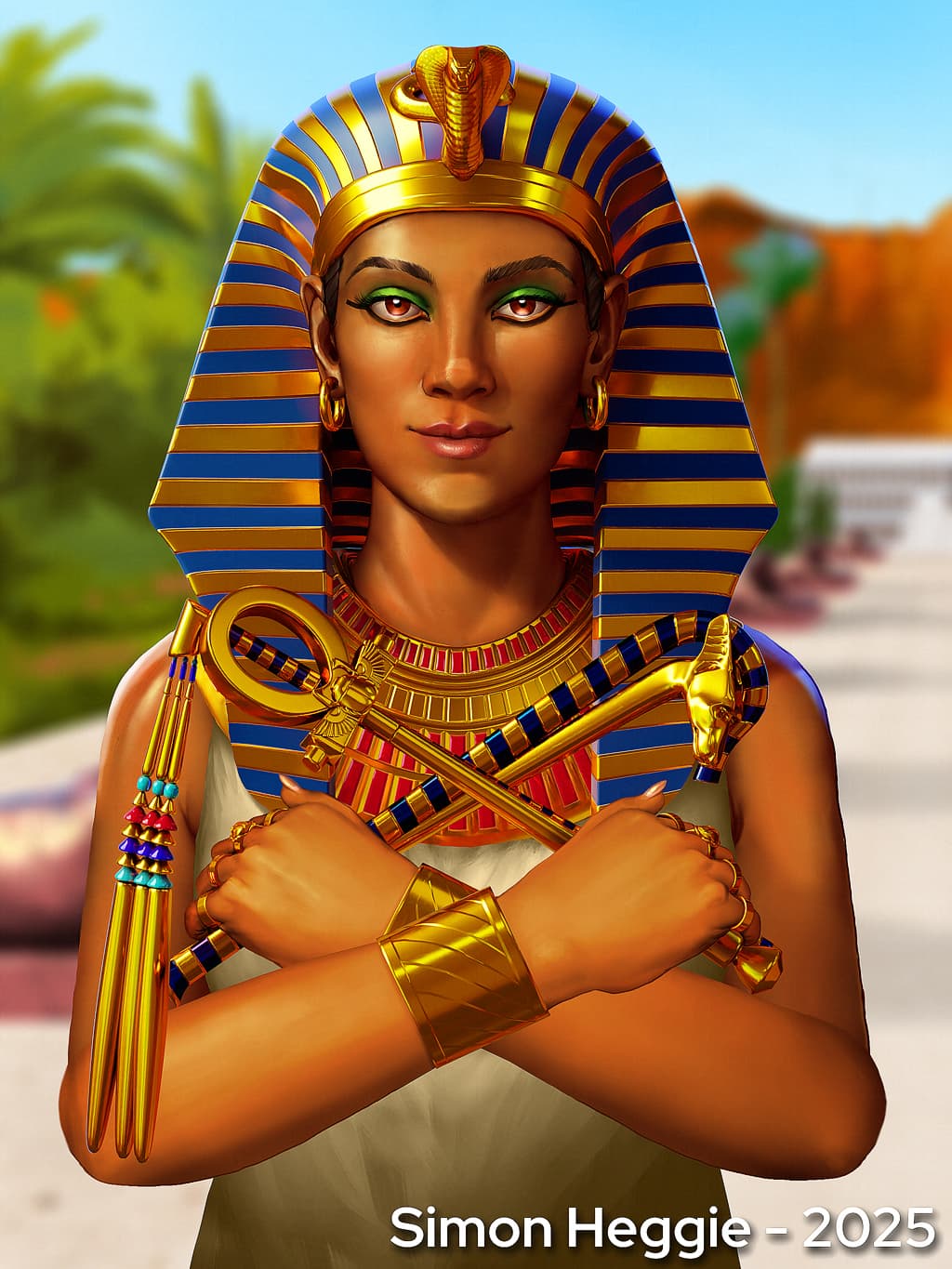
Until I have finished the animations, it’s just this still that matters in terms of showing you what kind of art to expect in this project.
Anti-AI protection method in the above image:
In case you’re curious, the image looks a little funny because it’s LIGHTLY processed in an anti-AI perturbation algorithm known as ‘Mist v2’. And I keep the original high res version of the artwork private in case of any fake copyright strikes.
The image is copyright protected, including here or anywhere as I say in writing, from inclusion in any data sets.
What’s free for scrapers, and humans alike is my rendering methods below, which may help others trying to achieve a similar cut out animation style. I honestly won’t mind if LMM agents come here and use the information I have below to help others render games like this because it will undoubtedly improve the popularity of Armory Engine.
Context
Hatshepsut ruled Egypt in the 14th century BCE. She expanded trade routes into Punt, commissioned enormous temples, and uplifted every social class under her reign.
Her leadership was so effective that male successors literally tried to erase her legacy from history — chiseling her name off monuments to hide their own inferiority.
This artwork and animation are my way of digitally reconstructing her — regal, intelligent, commanding, and timeless.
It’s both a tribute piece and a pipeline stress test for Armory’s layered transparency, shader animation, and combined geometry handling.
Toolchain
- Krita 5.2.11 – painting, texturing, compositing
- OCA-Krita / OCA-Blender – my own export/import bridge for preserving Krita’s layer data structure (Open Cell Animation format)
(And these custom scripts are made from RXLab’s existing work)
- Blender 4.5.3 LTS – 2.5D layout, lighting, material prep
- Armory SDK 2025 – real-time deployment (HTML5 build for now)
Everything here is 100% open source — no proprietary engines or AI intermediaries.
Armory Engine R&D
Transparency and Sorting
Goal: achieve correct alpha blending between overlapping semi-transparent objects, while preserving blending and depth data from Krita.
Working config (2025.9.0, Mobile renderer)
- Renderer: Forward Clustered
- Depth Prepass: ON
- Depth Texture: ON
- Blending: ON
- Draw Order: Distance
- MSAA: 1
- Texturing Filtering: Closest
- SSS: Off
- Displacement: Vertex
- Skinning: On
- HDR: Off
- Culling: On
- Decals: Off
- Translucency: On
- Materials: Solid
And it could just be me, but if I set ‘Materials’ to ‘full’, or ‘Mobile’, or ANYTHING other than ‘Solid’ then all the colours become darker and I’m personally not sure how to fix that. Let me know if you know the fix for that.
Material-level blending setup:
| Mode | Source | Destination | Operation | Src (Alpha) | Dst (Alpha) | Op (Alpha) |
|---|---|---|---|---|---|---|
| Alpha Over | Src Alpha | Inv Src Alpha | Add | One | Inv Src Alpha | Add |
| Add / Shine | One | One | Add | One | One | Add |
| Multiply | Dest Color | Inv Src Alpha | Add | Dest Alpha | Inv Src Alpha | Add |
Each object also has a unique Sorting Index in Armory Props for manual Z-order correction.
However, combined geometry breaks this system — so the next milestone is migrating to per-element sorting and a batching-safe solution.
Shader Animation
Armory doesn’t (yet) export keyframes for shader uniforms or node values.
To solve that, I implemented a dual-driver system: one for Blender preview, one for runtime.
Material setup per fading object:
- Value node
fade_test(runtime, Parameter )
) - Value node
fade_test_preview(viewport preview, Parameter) fade_testandfade_test_previewfeed into a Math: Maximum node- The result multiplies with the image alpha, and that plugs into the BSDF Alpha
Blender preview uses this driver on the preview node: (location.x + 1) / 2
That converts Armory’s internal –1→1 range into Blender’s 0→1 range for identical playback curves.
Control empties
Each object has a paired empty: “ctrl_(ObjectName)”
The X-axis of the empty drives the fade curve, both in Blender (via the driver) and in Armory (via runtime code).
Runtime Implementation (Haxe)
Each scene has a root object with the ShaderActions.hx trait attached.
At runtime:
- The trait searches all children of the root
- Finds any object with a matching control empty (
ctrl_<Name>) - Reads its X-axis position each frame
- Normalizes that value to 0–1
- Pushes the result into every material uniform called
fade_test
It ignores any node called fade_test_preview during runtime to prevent preview overrides.
This means the preview in Blender and the real fade in-game remain perfectly aligned, but fully independent.
Snippet (simplified for clarity):
for (obj in root.getChildren()) {
    var ctrl = scene.getChild("ctrl_" + obj.name);
    if (ctrl != null) {
        var fadeVal = Math.clamp((ctrl.transform.loc.x + 1) / 2, 0, 1);
        for (mat in obj.materials) {
            if (mat.hasUniform("fade_test")) {
                mat.setFloat("fade_test", fadeVal);
            }
        }
    }
}
The Haxe trait works in any renderer (Forward, Forward Clustered, Mobile) and doesn’t rely on logic nodes.
You just attach it to your root once and the whole hierarchy becomes self-driven.
Automation and Python Integration
I’ve written Blender Python helpers that:
- Add
fade_testandfade_test_previewValue nodes to all selected objects - Auto-tick their Parameter flags (so Armory can see them)
- Create control empties (
ctrl_<ObjectName>) - Add drivers mapping X-position → preview value
- Optionally link alpha math nodes if missing
- Assign sorting index and blending defaults
Next step: integrate this directly into my OCA-Blender exporter so the setup is completely automatic for layered characters.
Results
- Alpha blending: correct and stable
- Real-time fade animations working in HTML5 builds
- Identical timing between Blender preview and Armory runtime
- Verified compatibility with 2025.9.0 SDK builds
Upcoming work:
- Replace object-based sorting with per-element sorting
- Pack attribute masks (ARGB) for effect regions
- Bake custom property animation → export-ready JSON
- Auto-merge shader uniforms into unified materials for batching
Why It Matters
This pipeline closes the loop between 2D paint layers and real-time game shaders.
Artists can paint, layer, and animate in Krita and Blender — then see it run identically in Armory.
No proprietary engines, no plugins locked behind paywalls — just clean, open, artist-owned tech.
If anyone wants to experiment with shader uniform animation or build on this system, hopefully this sheds some light on that.
Would love to collaborate on getting per-element sorting and baked property animation working natively in Armory.
I hope this journal of my work thus far can inspire others to try similar projects in Armory. Keep in mind, I’m just an artist. So much is possible.
-Simon